

2016 Social Media Strategy For NHance
This article has been put together to break down the strategies discussed in our 2016 Social Media Strategy for NHance webinars that we hosted in November.
Many of our clients who are already taking advantage of these strategies are seeing increased traffic, engagements and conversions as a result.
Before we jump into it, if you weren’t able to participate in the webinar and haven’t yet watched the replay, it would be a good idea to start off by watching it here. The presentation is about 30 minutes and short section on Alien Run and myself and then the Q&A that follows is full of nuggets too, make sure to watch the whole thing! You will be glad that you did…
2016 Social Media Strategy – The Action Plan
The meat in our webinar was without question, The Action list, what can you do in 2016 to really start to ramp up your Social Media engagement?
I boiled the Action list for 2016 Social Media Strategy down to the 3 strategies discussed in the video above. Let’s have a look of each of them in more depth and I will give precise instructions on how to achieve results with each of these.
For clients, please understand, this is for those that have been asking what else can I do. We already employ all of these strategies in your account on a weekly basis but obviously we have a finite amount of time to spend in each account every week.
If you have been wondering or asking, “What more can I do?” Sink your teeth in here… As far as I am concerned the second strategy, Social Proof, is something that everyone should be doing!
2016 Social Media Strategy #1 – Interaction (15-30 Minutes/Day)
Interaction refers to how you can begin to Engage with people on your Facebook page using both your business and personal profile.
To be clear, as an Alien Run client, we are on your page doing this at minimum once per week to make sure important comments, negative comments or reviews are addressed as they need to be. As mentioned in the video, as a business owner you can easily nail this strategy in 15-30 minutes per day.
Before you can Interact, it would be great to know when you have something that you should interact with… This is where taking a few minutes to review your Facebook Notifications settings could really help you out.
Review your Facebook settings in two separate locations, your personal profile and your business page settings.
Personal Settings – Click the drop down menu in the top right corner of the Facebook page, click settings and then choose notifications. From here you can adjust the settings for all notifications. You can even decide to have notifications sent by email or text message if you like. I don’t do that, I keep it all within Facebook, but make sure you click ‘Edit’ under the pages you manage and that notifications are turned on for your page.
Page Settings – Navigate to your Business Page, click Settings from the top right menu and then Notifications from the left sidebar and edit these according to how you would like to be notified. Ensure you turn the notifications for the page on at the top and then select what types of events you would like to be notified about.
I have gone over both of these notification settings in this short video:
Now, that you are receiving notifications, how do you interact with them?
One thing that you will begin to see, is a lot of comments take place on our ad campaign because this is the content that we are paying to put into peoples newsfeed.
There are a couple types of negative comments here that should be blocked or deleted. First off, if you see any comments that offer negative feedback on your business or might be construed that way, theseshould be blocked. The second thing that happens is other, less scrupulous, business owners may try to piggy back your ad by placing information about their own business in the comments. This is because they know you are paying for traffic, they are too cheap to do so themselves and figure they can get a free ride in the comments. As this takes away from your ad and doesn’t ad any value I delete and ban these people because they will never be a customer to you…
Moving on to the constructive comments, always like the comment and if a response is required or appropriate, leave one. Don’t feel like you have to comment on everything, the commentor will receive a notification if you like their comment, that is enough.
Make your comments of a social nature and less of a selling nature… if you try to pitch anyone that comments, it comes off as desperation and it will stem the flow of comments. If you can get a conversation going in the comments it becomes relationship building not only to the person you are chatting with but to anyone who comes along and reads it after the fact.
To round out your 10-15 minutes per day, you can click, the top menu and ‘Use Facebook as you page’ and go out and interact with people and other organizations.
Make it habit to search out once a day or once per week, another company that you may have something in common with. Go their page and like and comment of some of their content. Over time this will lead others back to you page, both the business owners and their customers who read your comments.
This would be considered improving your Edge Rank and 10-15 minutes per day of this type of activity will help to increase organic distribution of your content as well as lead people back to your Facebook page where we have many hooks and Calls To Action to turn them into prospects.
2016 Social Media Strategy #2 – Build Social Proof (30-60 Minutes/Week)
***If You Are Only Going To Do 1 Thing Different This Year It Should Be This***
2016 is the year of Social Proof and when you are thinking about your 2016 Social Media Strategy there are not that many companies out there that have as much social proof available to show as NHance franchise owners.
The work that you guys do is absolutely unbelievable! As a former NHance owner, I understand, few things explain what the NHance process is better than being able to show someone your work.
Yet, many are guarding this like an Ace in the hole and reluctant to show it off.
That all changes in 2016, before you run off and start snapping pictures though please make sure you have watched this section of the webinar video and read this entire post to get the strategy down.
Here is what we are going to do – Upload Before & After Photos from your jobs once per week.
How? Send me an email with subject line: Before & After (disregard mention of the portal in the webinar – we are going to make this super easy – 1 job with all relevant information per email, please don’t send several different emails for each job)
Include: A Before & After photo, a description of the job, the location of the job, the customers name and email address.
We will create content Original to you from these submissions.
The first piece we create will be a collage of the Before & After that we will put on Facebook and then invite the customer, on your behalf, to Like, Comment, Share & Review your page.
This feedback from past customers is Golden content that money can’t buy and as you have probably already noticed, your reviews show up in Facebook graph bar search and many other places.
When your past customers write comments and share or write a review, all of their Facebook friends also see this interaction, it’s viral traction for your page and content that extends the reach of your ad spend that brings you some of the best customer referral business.
We will also use these photos when we can on your NHance.com photo gallery and in many other applications including posts, Facebook Carousels & Slideshows as well as in our outlying back-linking and social bookmarking applications.
It’s one way to get a lot of mileage out of one piece of content, we reformat it and use it everywhere that we can.
The other reason this is so powerful, as mentioned on the webinar, is that different people need to see different things in order to make the decision to buy from you.
People want to see their neighbors kitchen where they know you were just working. People want to see a kitchen that looks just like theirs.
So every kitchen is important, small kitchens, big kitchens, 1970’s kitchens, brand new home color changes… they are all important because people want to see something they can relate to.
Even what you consider poor photos often times have brilliant value. You may have noticed this in some of our content, people will often click an image that looks odd over a perfect image… It sounds crazy, but it’s true and, as you may have witnessed with some of our content and ads, we experiment and test these types of things all the time.
This is our way of collecting original content from you. We can’t come to your job sites and this can’t be replicated so while the onus of collecting the photos and sending the emails to us rests on you, you can trust that we will do a lot with them once we get them.
Your customers love to see this original content from your community, it builds you up as an authority in the towns and communities where you work.
Of course, it should be your goal if you don’t take great pictures to learn to take better ones but trust me, poor photos are far better than none at all.
So if you are serious about your business, we expect to see these emails from you on a weekly basis – just do it!

Another emerging trend for Social Proof in your 2016 Social Media Strategy is in instant Status updates. This has evolved in 2015 and will play a big part in 2016.
The great news is it is really simple to do.
Status Update: “Here is what’s happening in the shop today” followed by a photo or video (include your hardworking, smiling self or staff where possible) of activity surrounding the project of the day and a very brief description of what you are doing.
Other possible status updates might include asking a question; “What do you think of this color?” or “do you know anyone who has cabinets like these?” as you can see, there are a million possible posts but the idea is to catch it and report it as its happening as opposed to a recap from yesterday, last week or last month. It is something that you can often do in 1-5 minutes.
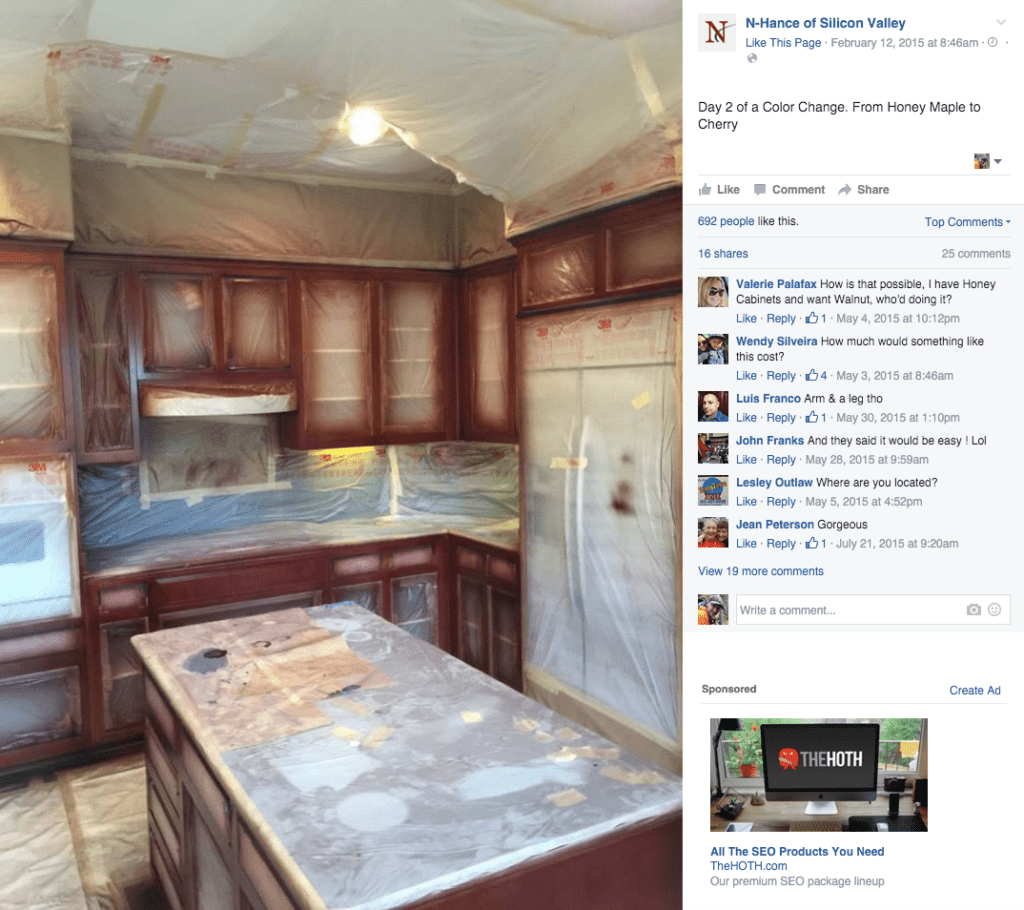
Here is a great example of Instant Status Updae from Jack at NHance of Silicon Valley: This post went viral with 16 shares, 25 comments and 692 Likes, all FREE traffic without paid promotion.
2016 Social Media Strategy #3 – Blogging (30/60 Minutes/Week)
This is by far the most complicated and the most time consuming strategy of what we have outlined here for 2016 Social Media Strategy but when done correctly it can also yield huge results over time.
You will definitely want to make sure you watch this entire section in the webinar above before you continue reading and watch the next short video.
As an Alien Run Client we are already producing 1 SEO blog post per week to your NHance.com website, we then take that content and use back-linking and Social bookmarking strategies to increase the reach of your overall SEO strategy.
The thing with blogging, is that you can never do too much. Google’s bots crawl your site all the time and they are looking for not only things that we outline here that will help them recognize your content as Search results worthy but they are looking for fresh content.
So with literally hundreds of thousands of longtail keyword possibilities out there, blogging everyday or adding even one post per week to what we are doing will greatly help your site show up when prospects search.
So here is the thing that everyone needs to understand. Adwords will not help your content’s page rank, only writing good quality content utilizing the rules that I am about to share with you can do that along with doing what you can to help more people see it, read it, comment, like and share it. Google is all about Social too, but not when you don’t produce relevant, readable and likeable content…
Let’s get after it. The first thing you need to do is to select a keyword phrase. Have a look a the image to understand a keyword vs. a longtail keyword and the difference in competition and traffic.
Your strategy then as a ‘Beginner Blogger’ should be to try to write content to rank for longtail Keywords that don’t have a lot of competition. When you follow my strategy and continue to put out content, the collective amount of all these smaller searches slowly begins to to build up to more and more FREE traffic over time.
What’s better, is this traffic is highly qualified, all because you took the time to write content that matches what people are searching for in your area that relates to your business and the products and services that your offer. It’s Brilliant and over time it beats out paid traffic any day of the week but you have to stick with it and it doesn’t happen over night, it’s an evolution.
Finding your keywords… there are a couple ways to do this. The first thing is that you have to try to get out of your own head and into the thought process of people who have no idea who or what NHance is.
If you think you are going to write about tintable polyurethane base and people are going to come running, you will be disappointed.
People are thinking about painting their cabinets or who can paint their cabinets or refacing or what options do I have with my cabinets… etc. So here is how I would tackle coming up with keywords.
Think about the problem your service is solving, what type of questions would people who have this problem ask Google? Write down about 5 phrases that are at least 4 words long. (Longtail Keyword) now go to Google and start typing those phrases into the search bar yourself.
You will see that Google itself will give you a short list of relatable longtail keywords that Google users are already asking.
Watch the video, I will cover using Google for Keyword Ideas first and then outline the SEO formatting inside your wordpress dashboard for each post (see the next set of notes below the video for the SEO formatting)
If you want to use blogging as part of your 2016 Social Media Strategy, here are the steps to create an SEO blog post on your NHance.com website.
- Write a 300-500 word blog post on a specific topic as discussed in keyword selection
- Include the keyword phrase in the title
- Include the keyword phrase in the URL or permalink
- Include the keyword phrase in both the opening and closing paragraphs
- Include the keyword phrase in each of the following instances
- H2 Heading which you achieve by switching to the text editor and putting your keyword in between the commands for an H2 heading, it will be typed like this <h2>Put the Keyword in between the commands</h2> and look like this:
Put the Keyword in between the commands
- H3 Heading which you achieve by switching to the text editor and putting your keyword in between the commands for an H3 heading, it will be typed like this <h3>Put the Keyword in between the commands</h3> and look like this:
Put the Keyword in between the commands
- You will also then want to put the Keyword in Bold and italics. You can see examples of this in all of the posts that we have created for you on your blog and you can also go into the wordpress dashboard for each post and look at the formatting if you care uncdrtain and just be sure to leave the page without updating anything and nothing will be changed.
- Once you have complete the post, you will then wnt to attach it to 2 or 3 relevant categories.
- Assign tags, has described in the video, add each word of the keyword phrase seperated by commas and then add another couple related terms and click Add.
- Under Featured Imagae, click Select featured image and upload as described ensuring to add the keyword phrase to both the title and alt title. Do this for any images that you add to the article.
- Under Ultimate SEO, Use the keyword once in the title and two times in the meta description as shown in the last video.
- Once you have that complete, proof read once or twice for mistakes and once you are happy with what you have, click Save and then you can preview if you wish. Please note that the formatting of images, etc can often be different in preview than once published.
- If you are satisfied click publish and then view post, collect the URL and go and share on Facebook.
Again, this is by far the most complicated of the tasks outlined here and it may not be for everyone but if you are looking for different ways that you can contribute yourself to your 2016 Social Media Strategy, this is a quality content that will help generate more search traffic for your business.
You can also find all of these blogging tips built in to this post for another example of how to use them.
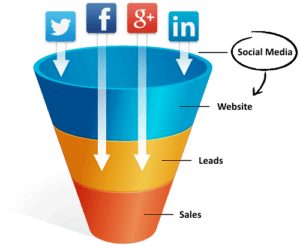
These are different strategies that you can use in 2016 to continue filling your funnel and sorting the suspects from the prospects
Have a Great Year!